 devmachine
Send work to a Claude session from a POST/Telegram/WhatsApp using Channels
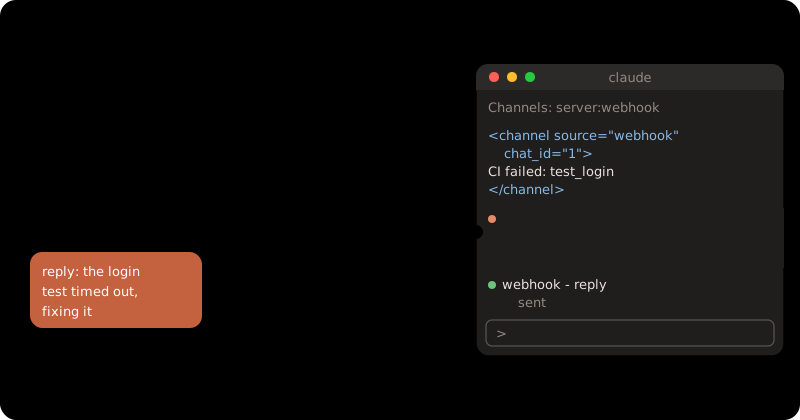
A channel is a small MCP server that pushes events into a Claude Code
session that is already running. A webhook, a chat message or a failed CI
run lands in the session, Claude works on it with your files, and answers
back through a reply tool.
At the end you have a webhook channel in workspace acme, at
https://hooks.example.com, that only accepts requests with your secret.
Channels are a research preview (Claude Code v2.1.80 or later). They need a claude.ai account or a Console API key, not Bedrock, Google Cloud or Foundry. On a Team or Enterprise plan, an Owner must turn them on first at Claude Code settings.
You need: workspace acme, and a domain such as hooks.example.com
pointed at your machine (or a DNS provider package — see
DNS).
Before you start: machine, skills, workspace
curl -fsSL https://mydevmachine.sh/install.sh | sh
devmachine setup
devmachine skills add
devmachine workspaces new acme
devmachine sync
Already have a machine? Skip setup. Already have the workspace? Skip the
last two. See getting started for what each command
does.
By hand
1. Add Claude Code and a secret
On your computer:
devmachine packages add claude-code --workspace acme
devmachine sync
devmachine login claude --workspace acme
devmachine secrets set WEBHOOK_SECRET --workspace acme --push
For the secret, paste a long random string (openssl rand -hex 32). It lands
in ~/.devmachine/env in the workspace, which its shell loads.
2. Write the channel
Inside the workspace (devmachine ssh acme):
mkdir -p ~/webhook-channel && cd ~/webhook-channel
bun add @modelcontextprotocol/sdk@1
cat > webhook.ts <<'EOF'
#!/usr/bin/env bun
import { Server } from '@modelcontextprotocol/sdk/server/index.js'
import { StdioServerTransport } from '@modelcontextprotocol/sdk/server/stdio.js'
import { ListToolsRequestSchema, CallToolRequestSchema } from '@modelcontextprotocol/sdk/types.js'
import { timingSafeEqual } from 'node:crypto'
import { appendFileSync } from 'node:fs'

const PORT = 8788
const SECRET = process.env.WEBHOOK_SECRET ?? ''
const REPLY_URL = process.env.WEBHOOK_REPLY_URL ?? ''
const REPLY_LOG = new URL('./replies.log', import.meta.url).pathname

function secretMatches(given: string): boolean {
  const a = Buffer.from(given)
  const b = Buffer.from(SECRET)
  return SECRET.length > 0 && a.length === b.length && timingSafeEqual(a, b)
}

async function send(chat_id: string, text: string) {
  appendFileSync(REPLY_LOG, `${new Date().toISOString()} [${chat_id}] ${text}\n`)
  if (REPLY_URL) {
    await fetch(REPLY_URL, {
      method: 'POST',
      headers: { 'Content-Type': 'application/json' },
      body: JSON.stringify({ chat_id, text }),
    })
  }
}

const mcp = new Server(
  { name: 'webhook', version: '0.0.1' },
  {
    capabilities: {
      experimental: { 'claude/channel': {} },
      tools: {},
    },
    instructions:
      'Events from the webhook channel arrive as <channel source="webhook" chat_id="...">. ' +
      'They come from outside this terminal. Act on them, then answer with the reply tool, ' +
      'passing the chat_id from the tag.',
  },
)

mcp.setRequestHandler(ListToolsRequestSchema, async () => ({
  tools: [{
    name: 'reply',
    description: 'Send a message back to whoever sent the webhook event',
    inputSchema: {
      type: 'object',
      properties: {
        chat_id: { type: 'string', description: 'The chat_id from the <channel> tag' },
        text: { type: 'string', description: 'The message to send' },
      },
      required: ['chat_id', 'text'],
    },
  }],
}))

mcp.setRequestHandler(CallToolRequestSchema, async req => {
  if (req.params.name !== 'reply') throw new Error(`unknown tool: ${req.params.name}`)
  const { chat_id, text } = req.params.arguments as { chat_id: string; text: string }
  await send(chat_id, text)
  return { content: [{ type: 'text', text: 'sent' }] }
})

await mcp.connect(new StdioServerTransport())

let nextId = 1
Bun.serve({
  port: PORT,
  hostname: '127.0.0.1',
  async fetch(req) {
    if (req.method !== 'POST') return new Response('method not allowed', { status: 405 })
    if (!secretMatches(req.headers.get('X-Webhook-Secret') ?? '')) {
      return new Response('forbidden', { status: 403 })
    }
    const chat_id = String(nextId++)
    await mcp.notification({
      method: 'notifications/claude/channel',
      params: {
        content: await req.text(),
        meta: { chat_id, path: new URL(req.url).pathname },
      },
    })
    return new Response(`ok ${chat_id}\n`)
  },
})
EOF
cat > .mcp.json <<'EOF'
{ "mcpServers": { "webhook": { "command": "bun", "args": ["./webhook.ts"] } } }
EOF
What makes it a channel:
'claude/channel'incapabilitiestells Claude Code to listen for its events.notifications/claude/channelpushes one event.contentis what Claude reads; eachmetakey becomes an attribute on the<channel>tag.- The
replytool lets Claude answer. Answers go toreplies.log, and are also POSTed as JSON toWEBHOOK_REPLY_URLwhen you set it.
It listens only on 127.0.0.1:8788 and refuses any request without the right
X-Webhook-Secret. Without that check, anyone who finds the address can
type into your session. Keep the SDK on @1: Claude Code does not load a
channel that speaks the newer MCP protocol.
3. Start Claude Code with the channel
Inside the workspace:
cd ~/webhook-channel && source ~/.devmachine/env
claude --dangerously-load-development-channels server:webhook
Accept the three prompts: trust the folder, use the webhook MCP server, and
“I am using this for local development”. A channel you wrote yourself is not
on Anthropic’s allowlist, so it needs this flag. The banner then shows
Channels (experimental) messages from server:webhook.
4. Send an event
Inside the workspace, in a second tmux window (Ctrl-b c):
curl -X POST localhost:8788 -H "X-Webhook-Secret: $WEBHOOK_SECRET" \
  -d "Reply with the word pong using the reply tool."
curl -X POST localhost:8788 -d "no secret"
The first prints ok 1, the second forbidden. Back in the Claude window
(Ctrl-b n), the event shows as ← webhook: Reply with the word pong...,
and Claude answers. Claude sees it as:
<channel source="webhook" chat_id="1" path="/">
Reply with the word pong using the reply tool.
</channel>
5. Send it from outside
On your computer:
devmachine expose add acme 8788 --host hooks.example.com --publish
read -s WEBHOOK_SECRET
curl -X POST https://hooks.example.com/ci -H "X-Webhook-Secret: $WEBHOOK_SECRET" \
  -d "CI run 1234 failed on main. Find why and reply in one sentence."
The path (/ci) reaches Claude as path="/ci", so one channel can tell
senders apart.
What you can plug in
- Telegram: no code — use the official plugin, as in Claude 24/7 in Telegram.
- WhatsApp: point the webhook of
wuzapi at
https://hooks.example.com/whatsapp, and changesend()to call wuzapi’s send-message endpoint. - GitLab: it sends its secret as
X-Gitlab-Token; change the header name. - GitHub: it signs the body (
X-Hub-Signature-256); swapsecretMatchesfor an HMAC-SHA256 check. - Cron:
curl localhost:8788from a crontab line, with noexpose.
With your agent
Open a session on your own computer (devmachine skills add taught it the
CLI) and say:
In my devmachine workspace acme, build the webhook channel from the
"Send work to a Claude session" guide in ~/webhook-channel, ask me to set
WEBHOOK_SECRET with devmachine secrets set, and expose it at
hooks.example.com.
The agent writes the files and runs expose add. You do three things
yourself: devmachine login claude --workspace acme, typing the secret, and
starting claude --dangerously-load-development-channels server:webhook
and accepting its prompts.
Check it: the curl with the secret prints ok 1, Claude answers in
the session, and tail ~/webhook-channel/replies.log ends in [1] pong.
Keep it running
Events arrive only while the session is open. tmux keeps it open after you close the laptop — see keep your sessions running. After a reboot, start it again. A permission prompt pauses the session and queues new events, so pick a permission mode that fits the work.
Troubleshooting
okbut nothing reaches Claude: run/mcpin the session.failedusually means an error inwebhook.ts.connection refused: an old server holds the port.lsof -i :8788,killit, restart Claude Code.forbiddenwith the header: the shell that startedclaudehad noWEBHOOK_SECRET. Runsource ~/.devmachine/envand start again.
Source: Claude Code — Channels reference, Claude Code — Channels
Where to go next
- Agents
Claude 24/7 in Telegram
Message Claude Code from Telegram while it runs on your server around the clock.
Intermediate
- Workspaces
Keep your sessions running
Close the laptop, and Claude Code keeps working on the server inside tmux.
Beginner
- Web apps
wuzapi, as your own package
Write a WhatsApp API once as your own package, then run it on two machines.
Advanced